Architecture
This page shows how a Program travels from text to changes in external systems, and which part of ActQL is responsible for each step. It assumes you have read Concepts.
Overview
  Application · CLI · Agent
        │  Program                              ▲  Results
        ▼                                       │
  ┌───────────────────────────────────────────────────┐
  │ Host                                              │
  │  policy and decisions · credentials               │
  │  placement, admission and progress of work        │
  │  ┌─────────────────────────────────────────────┐  │
  │  │ Core                                        │  │
  │  │  check → bind → plan                        │  │
  │  │  typed computation · Run state machine      │  │
  │  │  validation of execution candidates         │  │
  │  └─────────────────────────────────────────────┘  │
  │  Store                                            │
  │  observations · Results · Checkpoints ·           │
  │  Effect ledger                                    │
  └───────────────────────────────────────────────────┘
          │ reads · model calls · Effects       │ computation
          ▼                                     ▼
  ┌───────────────────────────┐   ┌─────────────────────────┐
  │ Connectors                │   │ Compute                 │
  │  SaaS · databases ·       │   │  the engine itself ·    │
  │  files · LLMs             │   │  DuckDB                 │
  └───────────────────────────┘   └─────────────────────────┘
The figure shows responsibilities, not processes. Which execution paths a given Host offers depends on the Host.
Core
The Core owns meaning. It checks Programs, translates them into one common typed representation, and builds the common execution plan: the operations, their types and inputs, the boundaries where external work happens, the definitions they rely on and their limits. It also holds the common machinery for validating and comparing physical execution candidates, the typed computation itself, and the state machine that decides when work may start, when it has completed and how a Run recovers.
The Core has no direct access to the network, the file system or any provider SDK. It is compiled for several targets — native code, WebAssembly and JavaScript — so the same checking and the same semantics run in every Host. The set of features each target supports can differ; the meaning of what it does support does not.
Hosts
A Host connects the Core to an environment. It:
- evaluates policy for each read, model call and Effect — allow, deny or delegate — and, when delegating, routes the decision to the decider the operator set up, waiting at a Checkpoint if the answer does not come right away;
- holds credentials, so Programs never contain secrets;
- keeps the Store: the durable record of each Run — what was read, which model answers were adopted, what was sent and with what outcome, the Results, the Checkpoints and the ledger of Effects — kept for the retention period the Host is configured with;
- places, admits and tracks units of work, and supplies resource limits. This is not a scheduler that starts work on a timetable; something outside ActQL starts a Run;
- realises the plan in its environment: given the capabilities of the Connectors and compute engines it has, its resource limits and the current permissions, it chooses how to execute each part, within the meaning the Core has fixed.
The Store is why recovery works. A Run can continue after a crash not merely because its state was written down, but because the Host can tell which inputs were adopted, which external operations were attempted, and what evidence came back for each.
Where the Host runs
| Shape | What it is | What differs |
|---|---|---|
| Embedded | The Local Host inside your TypeScript or Python application, or behind the CLI | The Store lives where you configure it, by default in a directory of your application. Approvals reach a person through your own code or the CLI |
| Remote | A Host that serves Programs over HTTPS | Your application sends Programs to it with the same SDK. Store, credentials and policy live on the server |
| ActQL Cloud | The same Core, offered as a managed Host | No Host of your own to operate; takes on work too large for a local machine |
ActQL is designed so that the environment does not change what a Program means. The same Program moves from your machine to a remote Host without changes, provided that Host has what the Program needs: the Connectors and model tasks it refers to, the capabilities its plan relies on, and limits that fit. When something is missing, the Host refuses the Program rather than running it with a different meaning.
Connectors
A Connector is the only place that talks to an external system. It declares:
- sources — the system's data, with fixed types and a version, in a form a Program can read (each one is a SourceView);
- capabilities — what the system can do itself: which reads and writes it offers, and what it can compute, such as filtering or aggregating, and at what cost;
- Effects — the typed changes it can make, and how it confirms them.
The Connector performs the I/O and returns the evidence of what happened; the Core's contracts decide whether that I/O may start and what its result means. A Connector cannot mark its own work as complete, and a cancelled request is not assumed to have stopped until the Connector's confirmation and the Host's own view of the execution agree that it has.
LLMs are reached through Connectors too, but INFER crosses a boundary of
its own: a model task is a different contract from a source, and a model call
is authorised, limited and recorded as an observation in its own right.
How a Program runs
Take the churn-risk Program from Concepts: join Salesforce accounts with Snowflake usage, ask a model for each account's churn risk, and write the high-risk ones back to Salesforce. The figure shows where each part of it runs; the numbers in the figure follow the Program's clauses, and the steps below follow the execution.
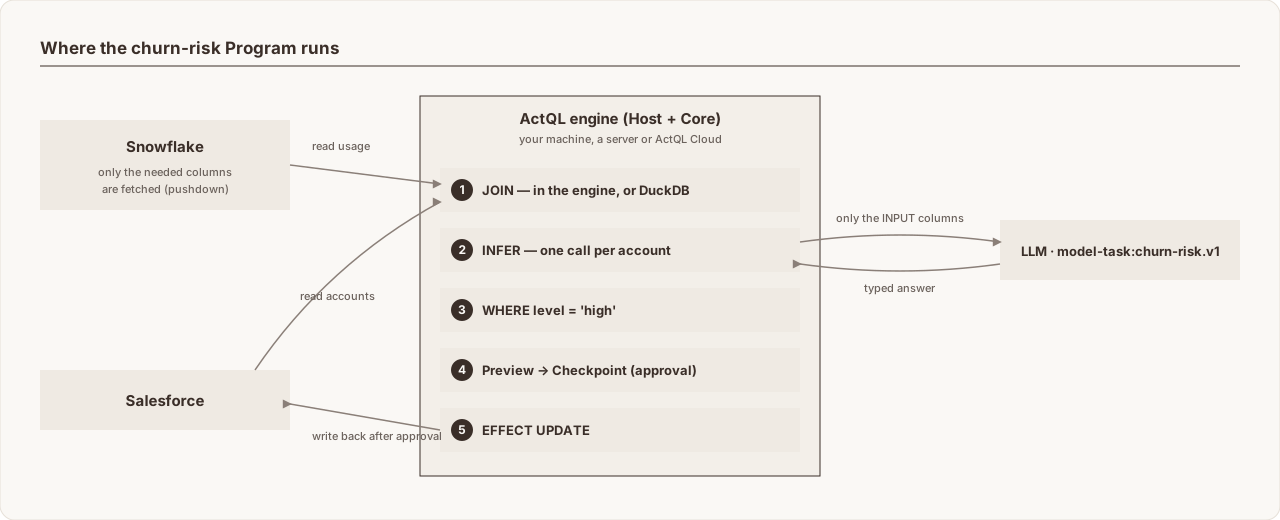
- Check. The Core validates the Program against the Catalog and schemas
the Host publishes — names resolve, column types fit, the model task's
inputs and outputs match, the Effect's target and fields are writable —
without reading business data. Here:
salesforce.accountsandsnowflake.usage_30dresolve with the columns used,churn-risk.v1returnslevelandreason, andChurn_Risk__cis a writable field onAccount. The actual state of the external systems, and the current permissions, are confirmed again at each execution boundary. - Bind and plan. Parameters are bound and the Core produces the common plan: the operations, their limits, and the boundaries where external work happens. Here: two reads, a join, a model call and one Effect, each with its limits. How the plan is placed is decided by the Host from its environment and the Connectors' capabilities: column selection and filters that a source supports run in the source; the join runs in local compute — the engine itself, or DuckDB.
- Admission and capture. Before each read, the Host evaluates policy. The Connector fetches the data and the Core captures it as an observation. Recovery never reads it again; a later stage that declares a new read gets a new observation.
- Compute and INFER. Typed computation — here the join — runs on
captured inputs. For
INFER, the Host authorises access to the model and the egress of theINPUTcolumns, the model is called once per account, and each answer is type-checked and recorded as an observation. The filter onrisk.value.levelthen runs on those answers. - Preview and Checkpoint. Before an Effect is applied, its exact changes
are computed. Here: a list of accounts, each with the new
Churn_Risk__candRisk_Reason__cvalues. Policy answers allow, deny or delegate; if the decision has to wait, the Run stops at a Checkpoint with that preview, whose content is fixed. - Apply and reconcile. The Host checks the approval and the conditions for applying, then sends the Effect and validates the Connector's result. An operation recorded as applied is never applied again. A missing reply leaves the outcome unknown; the Host reconciles it from the evidence of the original operation and the Connector's contract, and does not resend where safety cannot be shown.
- Result and completion. Named Results are published to the caller
through the Store, and the Run ends
succeeded,failedorcancelled.
This is the order of explanation. A Program without Effects skips steps 5 and 6, a Program with several stages repeats some steps, and a Result may be published before the end.
Recovery
The Host keeps the observations, execution state and evidence of external operations that continuing a Run needs. When execution is interrupted — by an approval, a crash or a restart — the same Run continues once the evidence, permissions and retention it depends on are available. Captured observations are reused, applied Effects are not sent again, and an operation with an unknown outcome is reconciled, not re-run. A missing record is never taken as proof that nothing happened.
Next
- Concepts: the vocabulary used on this page.
- Language design: the principles behind the syntax.
- Execution specification: Runs, Checkpoints and Effect outcomes in full.
Source: actql/actql/docs/concepts/architecture.md at d904416674e4 · Edit on GitHub